Alex Hawkins for State House
Campaign website for Michigan House District 55 with an interactive district map, endorsements, and volunteer sign-up.
Alex Hawkins website preview

The campaign needed a modern, mobile-first website that made it easy for voters to learn about Alex Hawkins and for supporters to take action.
We built a campaign hub with dedicated pages for Alex's bio, key issues, endorsements, and ways to get involved, with clear calls-to-action throughout the experience. Donations route directly through ActBlue to keep contributions secure and familiar for supporters.
To make the site genuinely useful for District 55 residents, we added an address-based district checker and an interactive map with layers for schools, parks and trails, libraries, government buildings, and local landmarks, alongside the district boundary.
The result is a fast, shareable campaign website that supports outreach and organizing while keeping messaging consistent across devices.
Tech Stack
Key Features
- High-conversion homepage with clear donate and get-involved CTAs
- ActBlue donation integration
- Volunteer and supporter sign-up form with validation
- Endorsements directory with category filtering
- Interactive District 55 map with address lookup and layer controls
- SEO + share-ready metadata for campaign messaging
What we built
A Campaign Homepage Built to Convert
The homepage opens with a full-bleed hero featuring Alex's professional portrait against a bold blue backdrop with red diagonal accent stripes that evoke patriotic energy without feeling generic. The hero copy is immediate and clear -"Veteran. Public Servant. Community Leader. Democrat for Michigan State House District 55." -with two high-contrast CTAs: Donate Now (red) and Get Involved (outlined white).
The navigation bar runs across the top with direct links to Home, About, Our District, Issues, Endorsements, and Get Involved, plus a prominent Dashboard button for campaign staff. A subtle District 55 map watermark sits behind the hero content, reinforcing the geographic focus. Below the fold, the site flows through key issues, endorsements, and calls-to-action -every section designed to move visitors from interest to action in as few clicks as possible.

Full-bleed hero with patriotic color system, clear CTAs, and District 55 map watermark
Campaign HQ Dashboard for Operations
The admin dashboard gives campaign staff a centralized command center for day-to-day operations. The overview page opens with a welcome banner showing the current date and a quick campaign status snapshot, followed by four color-coded KPI cards: Volunteers (blue), Endorsements (red), Yard Signs (yellow), and Students (green) -each with a real-time count and icon.
Below the KPIs, a Quick Actions row provides one-tap access to the most common tasks: Manage Volunteers, Review Endorsements, Yard Sign Requests, and Student Signups. The left sidebar organizes the full management suite -Overview, Volunteers, Endorsements, Events, Yard Signs, Students, and Users -with an Account section for Settings, Profile, and Sign Out. Role-based access ensures staff see only what they need, while developers get full system access.
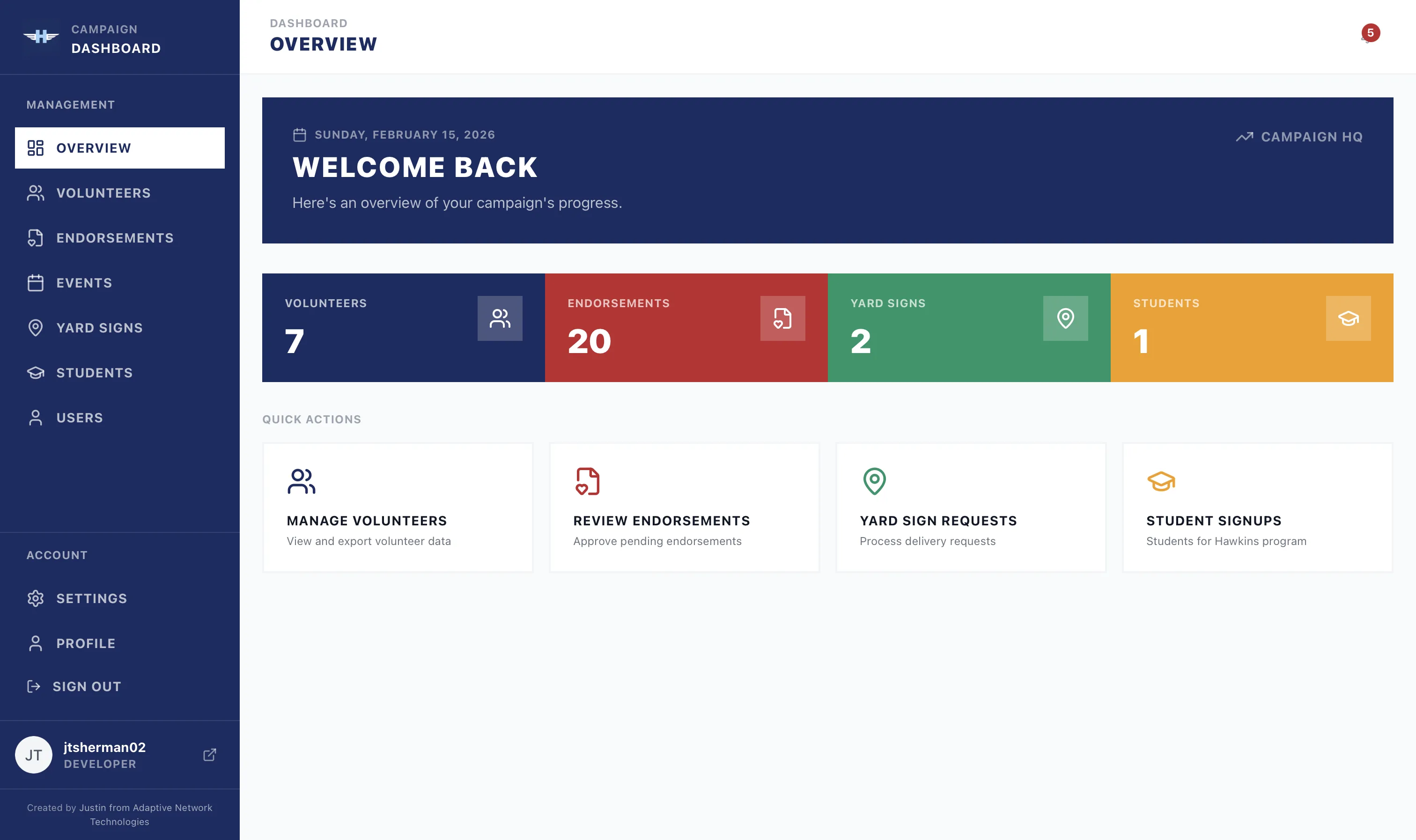
Role-based Campaign HQ dashboard with real-time KPIs and quick-action navigation
Real-Time Notifications for Campaign Activity
Campaign staff need to know the moment a new volunteer signs up or an endorsement application comes in. The notification system delivers real-time alerts for every key action -new volunteer signups, endorsement applications, yard sign requests, and student program enrollments -with timestamps, names, and direct "View" links to jump straight to the relevant record.
Each notification is categorized with a color-coded icon (blue for volunteers, purple for endorsements) so staff can scan their inbox at a glance. A "Mark all read" action keeps the feed clean, and the notification bell in the top nav shows an unread count so nothing slips through the cracks during busy campaign periods.
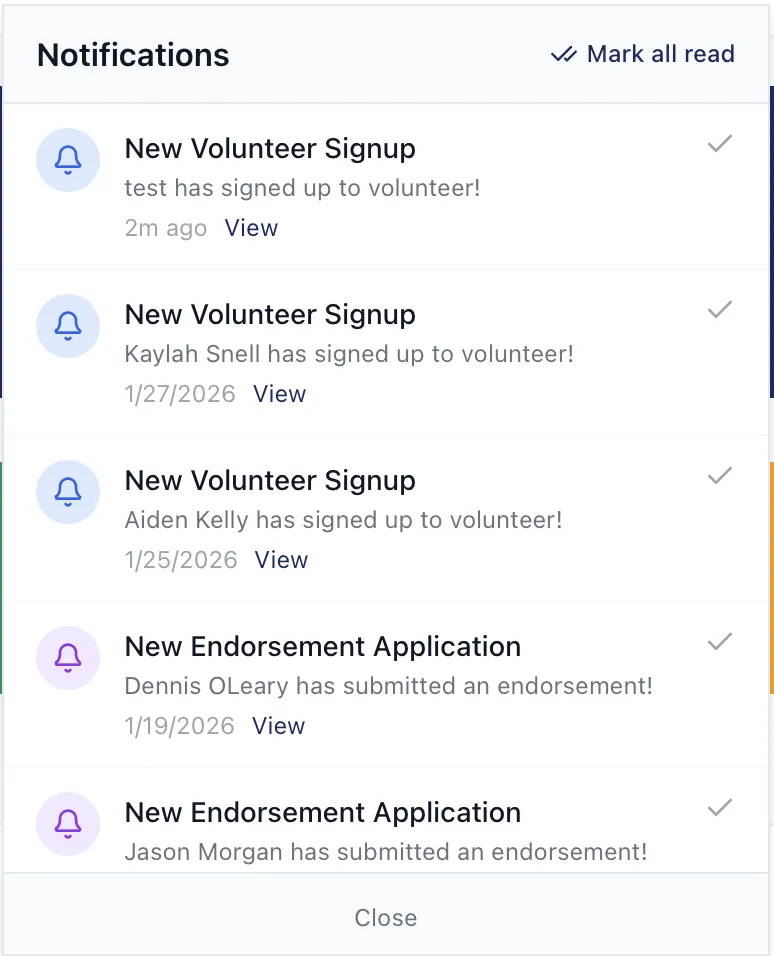
Real-time notification feed with categorized alerts and direct record links
Endorsements Directory with Category Filtering
The public endorsements page is designed to build credibility fast. Endorsements are displayed in a card grid with headshots, names, titles, and pull quotes -giving voters immediate social proof from trusted voices in the community.
A tabbed filter bar across the top lets visitors browse by category: All Endorsements, Elected Officials, Labor Unions, Organizations, and Community Leaders. Each endorser card shows their name, role, category badge, and a preview of their endorsement quote, with a link to read the full statement. The page is built to grow -as new endorsements come in through the dashboard, they appear on the public page automatically after staff approval.
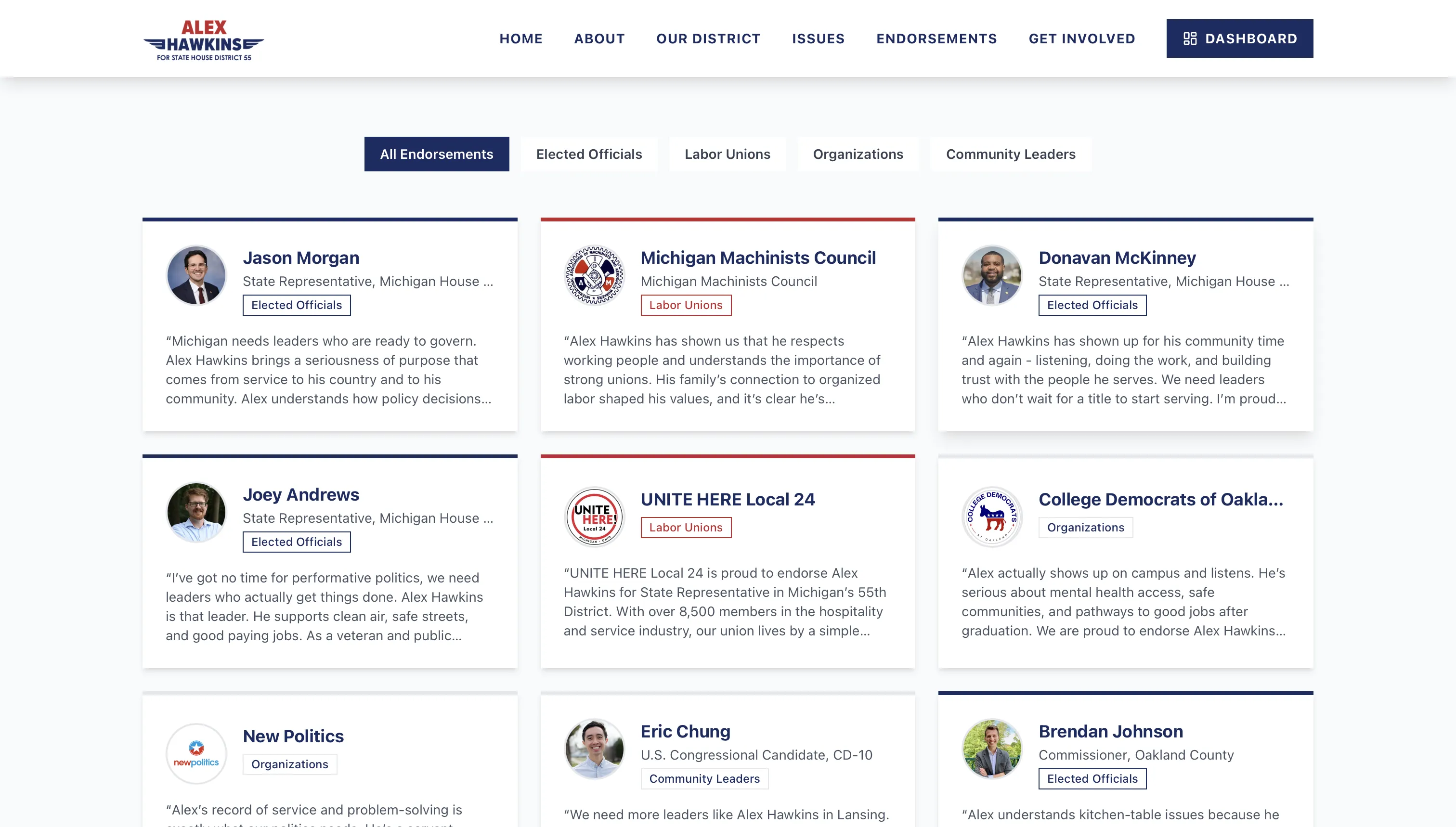
Public endorsements directory with category filtering and endorser quotes
Want something similar?
Get a free audit and we'll map out exactly what you need.